DUSK
A lofi beat maker for the M-VAVE FM-1.
⚠ Not yet tried on a real FM-1. Dusk is built and tested on every change, in CI and in the FM-1 emulator, but it has not been tried on an actual device. Install it at your own risk.
The kind of beat that sits on a morning coffee or study playlist: jazzy chords on a soft electric piano, a sub bass under them, lazy drums, a small tune on top, and all of it through a tired tape. You build it from clips: pick one for each of four tracks and it already sounds right; change one and it becomes your own.
Try it here
The firmware itself, compiled for the browser: the same code as on the FM-1, its sound, its screen, its panel and its keys' lights. Press PLAY, then turn ALGORITHM and PRESETS.
Start it, then press PLAY. The − and + beside a knob turn it; so does the mouse wheel over it. The keys also play from A W S E D F T G Y H U J K on your keyboard.
Install
- Open this page in Chrome or Edge on a computer (they can talk to the FM-1 over USB MIDI).
- Connect the FM-1 directly to the computer with a USB data cable, and switch it on.
- Close other apps that use MIDI, press Install and allow MIDI when the browser asks.
Loading the firmware…
Log
Do not unplug the cable while it writes (about a minute). If an install is cut off, the FM-1 stays in update mode: replug it and press Install again, and it finishes. If the FM-1 does not start at all, hold OCT− while switching it on: it starts in the USB rescue, where an installer always works. To go back to the official firmware, use M-VAVE's own updater M-UPGRADE. Installing firmware is at your own risk.
Using it
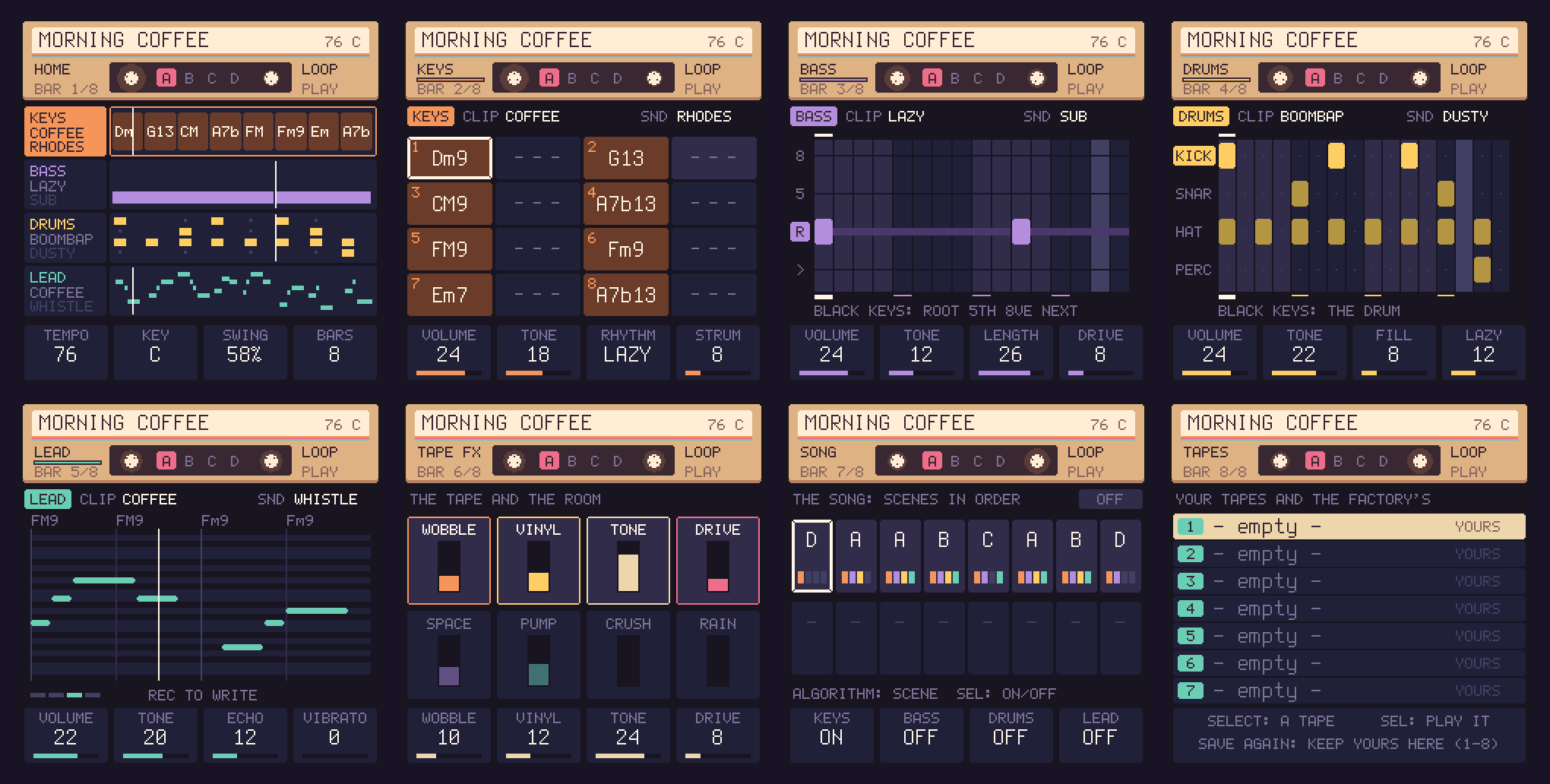
| SELECT | The cursor: the lane, the chord, the step, the place in the song, the tape on the shelf. |
| ALGORITHM | The clip of this track, from the bank. 0 is MINE: your own. |
| PRESETS | The sound of this track. |
| KNOB 1–4 | What the bottom of the screen says. |
| HOME | The four lanes. Keys F G A B: the scenes A B C D (hold one, press another: a copy). C D E F: the tracks on / off. |
| ARP · LFO · SEQ · EDIT | KEYS (every key is a chord), BASS and DRUMS (the white keys are the 16 steps), LEAD (play it; REC writes it). |
| FX | The tape and the room: wobble, vinyl, tone, drive; again: space, pump, crush, rain. |
| GLO | The song: scenes in order. SEL turns it on. |
| SAVE | The tapes: eight of your own, eight from the factory. SEL loads; SAVE again keeps yours. |
| PLAY · REC · ENV | Start / stop; write what the keys play; tap the tempo. |
More
- The source on GitHub, with every control and how it is made.
- Download the firmware file (
.fwsc), to install it another way (tools/fm1_install.py). - The file also runs in fm1-emu, the FM-1 emulator, in the browser.