
Firmware for the M-VAVE FM-1: a pendulum wall clock and a cuckoo clock.
⚠ Not yet tried on a real FM-1. FM-1 Clock is built and tested on every change, in CI and in the FM-1 emulator, but it has not been tried on an actual device. Install it at your own risk.
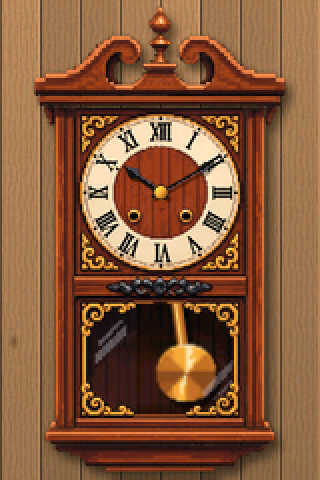
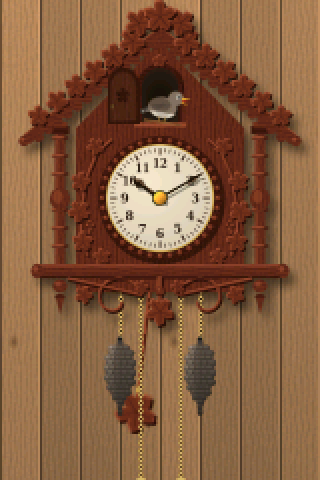
One day the FM-1 may be an almost forgotten treasure, so here is something that looks completely useless now and may turn out to be its only useful function: a clock. Its bell is a real 31-day pendulum clock's coil gong, taken apart into 742 ringing modes and rebuilt as FM synthesis. Turn ALGORITHM and a cuckoo clock carved in walnut calls the hours instead, its bird on two FM pipes over a wire gong. Both hang on the same panel wall.
Try it here
The firmware itself, compiled for the browser: the same code as on the FM-1, its sound, its screen and its keys' lights. It starts at your time; turn the sound on.
Start it: the sound is the clock's time, as on the FM-1, so it runs while it plays.
Install
- Open this page in Chrome or Edge on a computer (they can talk to the FM-1 over USB MIDI).
- Connect the FM-1 directly to the computer with a USB data cable, and switch it on.
- Close other apps that use MIDI, press Install and allow MIDI when the browser asks.
Loading the firmware…
Log
Do not unplug the cable while it writes (about a minute). If an install is cut off, the FM-1 stays in update mode: replug it and press Install again, and it finishes. If the FM-1 does not start at all, hold OCT− while switching it on: it starts in the USB rescue, where an installer always works. To go back to the official firmware, use M-VAVE's own updater M-UPGRADE. Installing firmware is at your own risk.
Using it
| ALGORITHM | The wall clock or the cuckoo clock: a turn, either way, switches to the other. |
| SELECT / PRESETS | The minute and the hour hand. Turned forward past the hour, it strikes it, as a real clock does. |
| PLAY | Strikes (or calls) the last hour again. |
| FX | The strike on or off. |
| ENV | Winds the cuckoo clock, when you like. Left alone, it winds itself when a weight is down: it never stops. |
| GLO | The keys' lights: they follow the pendulum, flash the hours, or stay off. |
| KNOB 1 / 2 | The ticks' and the strike's levels. |
The FM-1 has no battery-backed clock: it starts at 10:10 and forgets the
time when switched off. Set it with the hands, or send the computer's time over MIDI
(CC 20, 21, 22: hours, minutes, seconds) with tools/settime.py from the source:
pip3 install mido python-rtmidi
python3 tools/settime.py
More
- The source on GitHub, with everything about how it is made: the sound, the cuckoo clock, how it works.
- Download the firmware file (
.fwsc), to install it another way (tools/fm1_install.py). - Try it without an FM-1: open the file in fm1-emu, the FM-1 emulator, in the browser.