 EARLY ALPHA
A biomechanical sci-fi dungeon synth and groovebox for the M-VAVE FM-1
It should sound like its own disturbing machinery.
EARLY ALPHAIt runs here exactly as on the FM-1 (the same code, compiled to WebAssembly), it builds for the FM-1 and passes its tests, but it has not yet been tried on a real FM-1. Its sounds, its controls and the way it keeps its scenes will still change: a new version can forget what an older one saved.
Play it here
The firmware itself, the same C as on the FM-1, on a web FM-1. Press Start, then PLAY. SELECT picks a track, K1–K4 turn its four sounds; ALGO is MUTATE, how much the music changes by itself. PRESETS turns between its four scenes; SEL held and PRESETS turned loads any of thirty factory scenes. REC while it plays records the keys. Hold any button: the screen says what it does.
Press Start: the firmware loads when you do.
All the controls
| SELECT | The track: DRUMS (the kit, four zones of keys), KICK, SNARE, HAT, PERC, BASS, PAD, PLUCK, LEAD, NOISE. The keys play it; REC writes to it. |
| ALGORITHM | MUTATE: how much the music changes by itself, on every page (0: a locked loop). |
| PRESETS | The scene: R00 ABYSS, R01 RUST, R02 THE AWAKENING, R03 ASH (playing: on the one). SEL + PRESETS: one of thirty factory scenes into this one (CRYPT, STARGATE, CATACOMB, ORACLE, FROZEN, GRINDER, SHRINE, …). |
| K1–K4 | The page's four, for the track. |
| HOME | PLAY: the nine tracks and their steps; K1–K4 the track's four, named as its sound has them (DRUMS: the four drums' levels). Again: MIX: LEVEL, PAN, PUMP, MASTER. Held: white keys 1–9 mute the tracks, 10 the drums. |
| SEQ | STEPS: STEP, LENGTH, VELOCITY, CHANCE; again: the track's length, REPEAT, NUDGE, NOTE. Held: the white keys are the track's 16 steps; tap to set or clear, hold one and turn a knob for a lock. |
| EDIT / ENV | SOUND: the sound (a list: ORGAN, STRINGS, BRASS, HARPSI, CHOIR, GLASS, BELL, DUB, …; TICK, CLAP, DEEP KICK, …), TUNE, ATTACK, RELEASE. Again: its ARP (a drum: what it is made of). |
| FX | The track into DELAY, REVERB, CRUSH; TAPE wavers it all. Again: the delay's TIME and FEEDBACK, the reverb's ROOM (down to a CATHEDRAL) and TAIL. |
| GLO | SONG: TEMPO, SWING, KEY, SCALE. Again: the chain: this scene's BARS, THEN which. |
| ARP | Tapped: the track's ARP. Held: break it on the white keys: STUTTER, INVERT, FREEZE, SPASM, REPEAT 1/16, REPEAT 1/8, REVERSE, SMEAR, SCREW, DROP. |
| LFO | Tapped: MUTATE and the register. Held: WRITE 0, WRITE 1, RESET, FUSE, LOCK. |
| PLAY / REC | Start, stop. REC: playing, record; stopped, STEP REC (K1 the step). |
| SEL + | OCT− UNDO, OCT+ REDO, PLAY PANIC, REC OVERDUB / REPLACE, SAVE every scene, EDIT: DEEP (every page of before, SHIFT and all; again: back). |
| SAVE | The scene (here: into this browser; on the FM-1: into flash, two slots, when it is quiet). |
A look
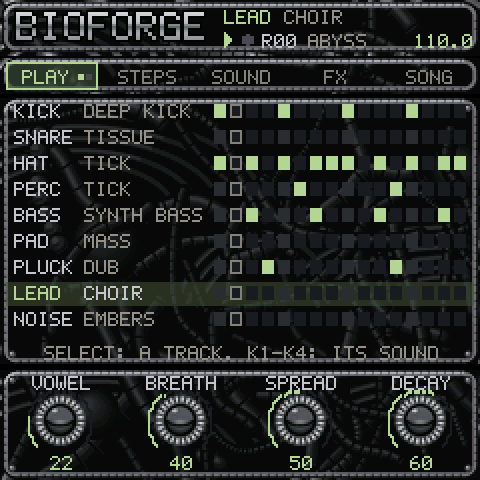
Nine tracks, four knobs
SELECT picks a track; K1–K4 are its four, named as its sound has them. Four drums of pressure, fracture, friction and vents, four synths, a noise. The keys go into the memory: LIVE REC, STEP REC, locks, overdub, undo.
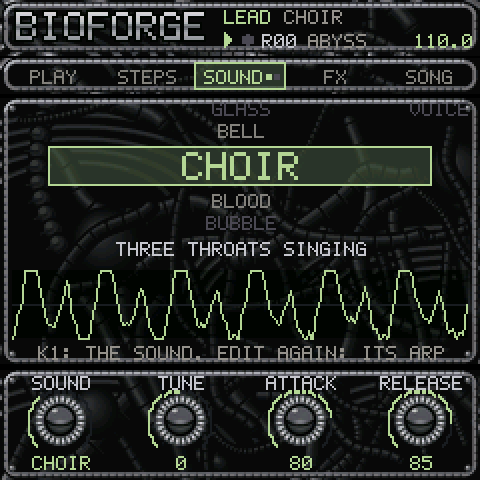
Organs and landscapes
Each synth its own voice or a landscape: ORGAN, STRINGS, BRASS, HARPSI, CHOIR, GLASS, BELL, HUM, STEEL, PISTON, BLOOD, BUBBLE, SLIME, DUB, MASS, CLUSTER; the pads play whole chords in the scale. Noise as percussion, a deep kick, a delay, a reverb of six rooms down to a cathedral. Scenes chain into a song. Both of the FM-1's cores at work.
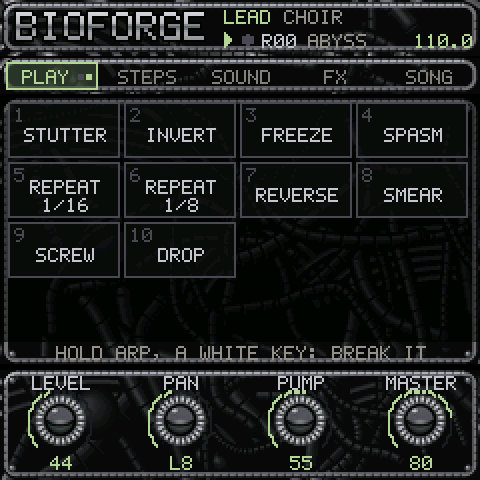
Hold a button: it tells you
ARP held breaks the music on the white keys: repeats, reverse, smear, a tape stopping. MUTATE lets a shift register after the Turing Machine change the noise, the notes and the cuts by itself, as much as you let it.
Hear it
Each one is the firmware itself on a computer, its keys and knobs played by a script, its sound as it goes out over USB: nothing added, nothing sampled. The picture is the spectrum, low at the bottom: click it to jump.
Install
- Open this page in Chrome or Edge on a computer (they can talk to the FM-1 over USB MIDI).
- Connect the FM-1 directly to the computer with a USB data cable, and switch it on.
- Close other apps that use MIDI, tick the box, press Install and allow MIDI when the browser asks.
Loading the firmware…
Log
This page installs the latest build of the main branch, which has passed all its tests
(download the .fwsc). Don't unplug the cable while it is writing (about a minute). If an
install is cut off, the FM-1 stays in update mode: plug it back in and press Install again to finish. If the FM-1
doesn't start at all, hold OCT− while you switch it on: the USB rescue, where installing always works. Any
firmware in the FM-1 Firmware Hub installs over BIOFORGE, and back.
Installing firmware is at your own risk.